All Discussions
  • Filters
  • I made a very easy DIY filter for dummies (with LG phones)

Started by Biden2020prez · Jul 17, 2022 · Page 1 of 3
Biden2020prez

I made a very easy-to-use filter for the LG Classic Flip and LG Exalt phones. To use it, just download the EXE file, and run it.

It opens a batch file to help the user setup his phone on ADB (ADB is built-in to the application), and when the phone is connected, it opens a new batch file where the user can choose what he would like to remove from his phone. I am hoping to add a feature to install apps4flip apps on your device, but I haven't done it yet (I also am not sure if there is any interest whatsoever in this, so I am releasing without that feature first).

I made a GitHub page for this project here:

I'd be happy for people to report issues or make requests and suggestions (here or on GitHub, here is probably easier for most people), and I'll be happy to help. This will also help me know if anyone actually cares for this.

Everyone have an easy MEANINGFUL!!! (lol) rest of your fast!
Helix_X_Dome

Heh.... Idk if this is muttar. you are taking away parnassah from companies that charge 40$+ to do this lol.

Biden2020prez

Helix_X_Dome It's not close to that level unfortunately... but one day I hope I learn how to make filters as good as (<YIMACH SHEMO> (AUTO EDITED BY MODERATOR)) (והמבין יבין), who by the way charges $75 last I checked (Unless you buy through TAG).

But to be fair, Livigent also offers for free, and theirs may be better than mine, (until I add on apps - hopefully soon IY"H)

Apps4Flip-Admin

@Helix_X_Dome I am assuming your joking but just in case someone takes your seriously. Its 100% muttar. Please don't disparage peoples hard work here like that. We have asked multiple reputable rabanim about the competition aspect many times and time and time again we always got the same response that it is 100% mutter and even encouraged as long as it's fair.

Techgen

Biden2020prez Nice, thanks for making an easy way for beginners to block apps on their phone (I didn't check it out yet so I don't have specific feedback) I assume the scripts are just removing apps through adb, which should answer any questions about how secure it is and about competition. (There actually was such a program, I think on the now defunct kosherappsforflip wix site) If you do add ability to install apps, can I suggest you add the ability to install more than one at a time? That would make it useful even for non-beginners. Keep up the good work!

Biden2020prez

chaimzalman No

Techgen Yes, unfortunately, I am not at the level to be a real competition with <>, but hopefully one day

Biden2020prez So may I ask how are you calling it a "filter" if there is a working reset button?

Biden2020prez

chaimzalman Because it filters the apps off your phone. It's a filter, just not fool proof

is there such an application for nokia flip phones?

Biden2020prez

LGFlip-Kosher v1.0.1

Changelog

Apps added!
That's about it, but it's pretty exciting.


Currently there is a list of 37 apps that can all be installed to your phone!

If you want any apps added to LGFlip-Kosher, no problem! Just open an issue (on GitHub), or post here, and we'll try to add more apps to the next release.

To run this program, just download the EXE file and run it. Follow all instructions.

Please open an issue to report any bugs, or make any suggestions. Alternatively, you can post it here.


Note: If you install mouse, voice access, or button mapper: This program automatically runs the commands to allow these apps to draw over other apps, and turns accessibility on, but doesn't give accessibility permissions, because that causes conflicts between apps. At the end, the program asks if you'd like to install an accessibility manager that allows you to give these permissions straight from your phone. If you choose not to get it, you'll need to find the right commands for your phone.


Credits:
https://apps4flip.com
/u/Uri
/u/xxdeafgirl

A few apps are for LG Classic Flip only.


Files:
LGFlip-Kosherv1.0.1.exe - Just download this and run

Biden2020prez

Sorry, I rushed a little in my post last night (it was late). I just copied straight from Github.

Basically, besides for the 37 apps offered, there are three more. Before you see a list of apps, you are prompted to get either version of apps4flip launcher, and when you're all done, you're prompted to get accessibility manager from xxdeafgirl.

The reason I made those apps separate is because I want the user to see that it's an important app, and he should highly consider getting it. If you are comfortable with ADB, you can just skip the accessibility app and run the commands yourself (although I find the app extremely useful).

Biden2020prez

Biden2020prez Sorry for flooding this thread (I hope I'm not taking up too much space).

A note about Supported phone models

The original version was only for LG Phones because it would remove packages based off the package name, for example com.lge.email, but it wouldn't work on a Kyocera because that package doesn't exist. That hasn't changed. However, the installing apps feature should work on all phones that can install apps using: adb install -g -r -d com.package.name (that's the command it runs). Note: There is an option to skip the removing apps part by pressing D, and go straight to installing apps.
On another note, if someone wants to give me the commands for another model (to remove browser, radio, hotspot, etc.), I will be happy to add that phone (or make a new version).


LGFlip-Kosher's limited capability

I want everyone to realize that this program can't tell whether or not the app was actually installed. It automatically says done, but sometimes it may have failed. For example, if you don't have enough space on your phone to install, it still says done, even though it failed. This is not a big deal, as the user will see the word "Success" when it works, and "Failed" when it doesn't work. Just that the program doesn't know, you need to see for yourself. If you see any errors that seem to be a mistake on my end, please report them!!!

Biden2020prez

LGFlip-Kosher v1.0.2


Changelog
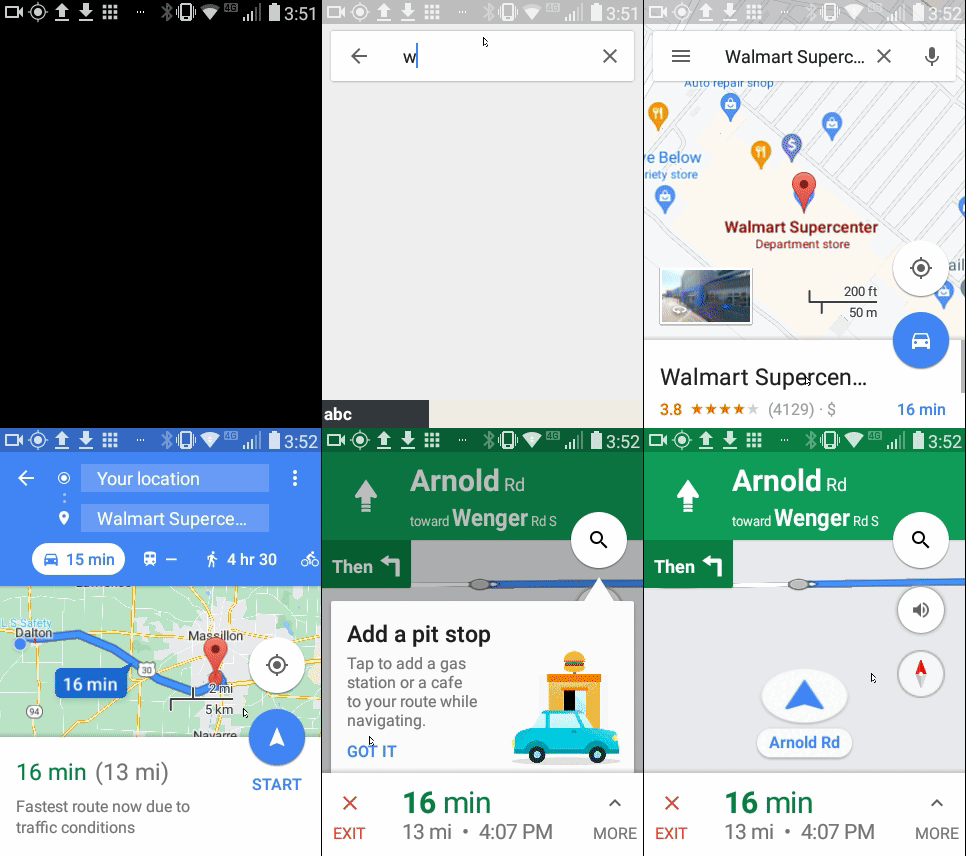
Exclusive! Google Maps added!


I managed to remove the update script from the Google Maps Apps4flip-Admin Posted.
You can install it using LGFlip-Kosher.


It's Working great now, no guarantees what will be in a month 🤣 (To be clear, I don't think updates will be an issue, but no guarantees)


Credits:
Apps4flip.com (everything - also for kashering Google Maps!)
/u/Uri (I used his work to create Rebel 4 settings mod launcher)
/u/xxdeafgirl (Rebel 4 settings mod/accessibility)
/u/boruch (Google Maps APK)
https://modifiedappsforflip.com (JewishMusic.FM, anydesk, xplore file manager)


Files:
LGFlip-Kosher v1.0.2.EXE
LGFlip-Kosher v1.0.2.ZIP
I added a zip for anyone with an antivirus that doesn't let them download EXE's.


I tried to make a cursor version, but it had the issues of

Flipp I was able to install the app. However, it does not seem to be working... It does not seem to sense my location, and if I click on a link for directions, it does not navigate.

and

Mglumpis I went to link and downloaded new version of google maps and transferred it to my lg exalt and it cannot locate my location or go to any destination. I uninstalled and reinstalled etc. I do have data. Bottom line it doesn’t work. PLease help

Apps4Flip-Admin

Super Cool and great work!, First of all just want to confirm that all the apps that are provided are kosher with browsers removed? Second would we be able to put the google maps apk on the main site, we will list you in the credits for it as well?

Biden2020prez

hk675 Hi, I posted a bad link on Friday, so I fixed it in Github, but didn't have time to update the forums. I just updated it, so you should be fine.

Apps4Flip-Admin Great question. I didn't check every app, unless I suspected issues, but now that I double check, I think they should all be fine (a lot are taken from you). (lucky patcher has ads, but I haven't seen anything inappropriate, and they don't get it the way. However, if you'd like, I can remove them....using lucky patcher of course.)
In terms of Google Maps, I'd be happy to do that (You and @boruch did a lot of it anyway). Do you think you can mention my project and link to here or GitHub?

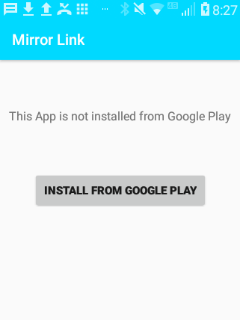
@Biden2020prez i see you have the app mirrorlink does that actually work to connect to a car?

i was wonndering if i install a mouse with your diy program [btw its amazing] does it kill the voice access app can they work together?

Biden2020prez

tekay13

Biden2020prez Note: If you install mouse, voice access, or button mapper: This program automatically runs the commands to allow these apps to draw over other apps, and turns accessibility on, but doesn't give accessibility permissions, because that causes conflicts between apps. At the end, the program asks if you'd like to install an accessibility manager that allows you to give these permissions straight from your phone. If you choose not to get it, you'll need to find the right commands for your phone.

Basically, it doesn't run the full commands. It offers you at the end to get accessibility app (it works great on classic, okay on exalt), which you can use without messing stuff up.

Otherwise, you can run the commands yourself.

For the record, this is the commands for the different mouse+voice access combos)

darth

Biden2020prez Would one command work for everything? (I think I put in button mapper, voice access, and 3 mice. Did I forget anything?)

Biden2020prez

darth That's a brilliant idea, I'll test it out soon, and let you know.

sdmde

Can you make a download for all the apps on the program so i can use them on another phone

Biden2020prez

It should work on other phones, see

Biden2020prez A note about Supported phone models

The original version was only for LG Phones because it would remove packages based off the package name, for example com.lge.email, but it wouldn't work on a Kyocera because that package doesn't exist. That hasn't changed. However, the installing apps feature should work on all phones that can install apps using: adb install -g -r -d com.package.name (that's the command it runs). Note: There is an option to skip the removing apps part by pressing D, and go straight to installing apps.
On another note, if someone wants to give me the commands for another model (to remove browser, radio, hotspot, etc.), I will be happy to add that phone (or make a new version).

sdmde

Biden2020prez i get a error it could be the apks are not compatible

Biden2020prez

sdmde You mean you're trying to install the apps on a phone with livigent?

sdmde

Biden2020prez no that was a different point i dont have lg phone it doent install because apk minamum sdk has to be lollipop

Biden2020prez

sdmde You mean it's an issue with the app and you want to modify the APK, or you need a different command to install it? (I am very disorganized, the APK's are in random places in my downloads folder, and I also try not to hand out the APKs by themselves, because I want people to try my program, I think they'll stay once they try.)

Biden2020prez

sdmde I'd much rather you put it on another phone and extract it, I'd rather not post the APKs.

Flippy

sdmde What app specifically are you looking for?

sdmde

Flippy all that are not on apps 4 flip

where does the apps come up on lg classic? i took off internet with the DIY filter but the apps arent coming up anywhere on the phone?

Biden2020prez

LGFlip-Kosher v1.0.3


Changelog
-Some Ads removed
-Added one-size-fits-all accessibility command at the end
-New call recorder app
-Option to remove app installation (apps still can be installed via ADB)
-New Shortcut from ADB Setup to go straight to filtering or installing apps


Call Recorder:
I know a number of people were looking for a call recorder but were having trouble finding one that works. This one has been tested on LG Classic and works beautifully.
Remove app installation:
This removes the option to install apps on the phone itself, but allows apps to be installed via ADB (including the Install Apps function of LGFlip-Kosher)
Accessibility command:
Thank to @darth I added an accessibility command at the end that grants permissions to every app. (the @xxdeafgirl accessibility app was moved to the regular app list).


As always, offer suggestions, report bugs, or kashrus issues.


Credits:
Apps4flip.com (everything - also for kashering Google Maps!)
/u/Uri (I used his work to create Rebel 4 settings mod launcher)
/u/xxdeafgirl (Rebel 4 settings mod/accessibility)
/u/boruch (Google Maps APK)
https://modifiedappsforflip.com (JewishMusic.FM, anydesk, xplore file manager)
/u/darth (providing a one-size-fits-all accessibility command)
https://github.com/virresh/matvt (for his amazing mouse!!!)


Downloads:
LGFlip-Kosher-v1.0.3.EXE
LGFlip-Kosher-v1.0.3.zip

Biden2020prez

I broke the links, there may be a temporary issue. I'll repost when it's working again.
This will have to wait till tomorrow, there is a critical issue.
Do not attempt to download! Im not responsible!

sdmde

Flippy downloads blocked

Flippy

sdmde I see. And their email address seems not to exist... So who is paying for the website?

Biden2020prez

Flippy Their downloads still work kind of. Bitly blocks their links, in the bitly link is a link to the download. Just copy that link and switch all the %2f to a /

Biden2020prez

My option to remove app installation bricked my phone I think. I'll fix my program then repost a new link.

Biden2020prez

MXRJR
Ah, I see that, I'll fix it soon. For now, (inside the letter c) you can use 1 for Call Recorder, and 2 for CRC Kosher and B to go back.

Biden2020prez

MXRJR Thanks, fixed. I appreciate you reporting that.

To everyone: If you are going to activate the call recorder from inside a phone call, I recommend pressing options before activating the mouse (because otherwise it dials *********************)