@lionscribe Will there be a update for the keyboard soon?
Thank you

@lionscribe Will there be a update for the keyboard soon?
Thank you
SamFried a-one BasicPhone @FliphoneBochur MXRJR @Biden2020prez @Flippy
To all who requested. Yes. I just updated HebKey(v1.12) with the following:
Get it at:
HebKey.apk
Please no more feature requests, as it is taking up my time. Just bug reports. 🥲
Thanks A Million!
Slowed down the key speed. The user has the option to adjust it in Settings.
What are the numbers 1 to 9, is it milliseconds?
Added options to customize all toggle keys. You can even set them all to be the same.
But when you use only 1 key in my case its the *key it will only switch "modes" and not "case" - except if i need to long press when using same key.
Added menu option in Settings, to reset to default options.
I dont see that reset option
Thanks again for your great work!
SamFried
Numbers are there just for scale. Technically, each digit is 200 milliseconds
If you use the same key, then toggling will include type and case. אבג->ABC->abc->123
The reset option is in the menu or menubar, depending on the device. Some devices may not have a menu.
lionscribe
Got it!!
Thanks again... Seems to be a complete project Its really good!
lionscribe
Thanks a million!
I want to install it on a phone without a apps launcher, how can i launch the app the first time by ADB?
lionscribe Please no more feature requests, as it is taking up my time. Just bug reports. 🥲
Found a minor bug, When in 123 mode the space is not working.

SamFried Is that a bug? I feel like in all 12key keyboards when in number mode only numbers and * and # will work.

BasicPhone I want to install it on a phone without a apps launcher, how can i launch the app the first time by ADB?
adb shell monkey -p com.android.cts.hebkey -c android.intent.category.LAUNCHER 1FliphoneBochur 3474336863
I suspect it is a badly written app. Please install latest version of HebKey (1.12), then enable first the mouse, then HebKey (from within the app).

lionscribe those not work.
3474336863 How does one activate the mouse?
lionscribe I think with the accessibility app or with adb.
You can turn on Keyboard, activate it, open a text, long press # to switch to Hebrew Keyboard. Then turn on mouse. Keyboard should still work, just you won't be able to switch back to default keyboard.
@Biden2020prez @darth @Apps4Flip-Admin
OK, I just updated the AppLauncher sub-launcher app (v1.12) The new version can show more than 9 apps, and it also will show more columns on wider screens. I do not plan on any new releases in the near future
As in version 1.10, there are 3 versions included.
Enjoy,
Lionscribe
Release 1.14 fixed crash when there was only one app installed.
AppLauncher.zip?usp=sharing
a-one By default it will only show user installed apps. To select other apps to show, just click on the menu button, and "Select Apps".
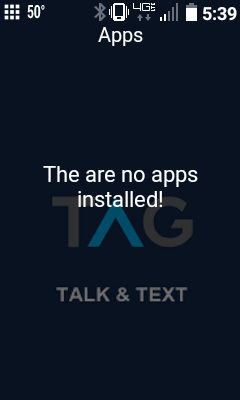
lionscribe I have apps installed but it doesn't show anything and there is no option of going to menu
Press the top left or right keys, the ones right under the screen, in order to bring up the menu options.
lionscribe it doesn't show anything when doing this on the LG Exalt
i cant install the button mapper on my nuu f4l . when i try installing it says that the app is incompatible with my device

Try Button_Mapper_4_Flip.apk and tell me if it works
lionscribe The link for the TCL sub-launcher doesn't work anymore. Are you able to re-post it?
dovi com.android.cts.applauncher
Reifam Scroll through the thread for different versions. The latest one is here: lionscribe
FliphoneBochur Thanks
whynot or something like mediafire or anonfiles since it allows anonymous uploading (which technically means unlimited???)

LucasFromOholeiTorah Yes. But anonfiles is awful (websie ui, ads, viruses...). Mediafire is really good.

GOLDFISH https://drive.google.com/drive/folders/1-FjDlFBlCKBDVGyDFq54y-e9sKXP1V6c is not working for netfree can you send me a new link?

AG2 GOLDFISH https://drive.google.com/drive/folders/1-FjDlFBlCKBDVGyDFq54y-e9sKXP1V6c is not working for netfree can you send me a new link?