All Discussions
  • Apps
  • [Beta Testing] - Test our apps before they are uploaded to Apps4Flip

Started by Biden2020prez · Nov 03, 2022 · Page 3 of 4
Biden2020prez

lionscribe thanks. good work. just so you know, com.att.deviceunlock is not going to show up in most phones' launchers. only the tcl flip uses that launcher. What you can do is add a notification listener and create a notification (on boot completed) so the app can be launched from notifications. Another less friendly way would be to make a broadcast reciever, with intent filer android.telephony.SECRET_CODE and make a host whichever phone number you want. then you can launch it using a *#*#1234#*#* code.

I made smali for both of those options, so I can add it and reupload if you want.

Biden2020prez Thanks. As mentioned I designed the App for the TCL Flip. It is not a full launcher, but blends in well with the TCL launcher. For notification style launchers, we already have the apps44flip launcher.

a-one

lionscribe As for the HebKey Keyboard app, I made it more friendly to other accessibility Apps (like the Mouse App). You can get it at
HebKey.apk

Please let me know how it works.
Lionscribe

It works amazing on the LG Exalt VN220 and on the Kyocera duraXV E4810 without any issues.

THANKS FOR THE AMAZING WORK

Biden2020prez

lionscribe true. but if it is only designed for TCL I don't think it is of any help to have a com.att.deviceunlock version (except for a tcl user who wants to keep his browser.

a-one

Biden2020prez true. but if it is only designed for TCL I don't think it is of any help to have a com.att.deviceunlock version (except for a tcl user who wants to keep his browser.

It's made for those who rooted there TCL phone and doesn't use a custom ROM because there is no way how to uninstall an app only disable or suspend is possible so it doesn't install if it's the same package name of the browser and if someone keeps his browser it won't show up in the main menu because it could only show 9 apps so when the browser is disabled and the com.att.deviceunlock launcher is installed after a reboot the launcher will show in the main menu instead of the browser

a-one

lionscribe As for the HebKey Keyboard app, I made it more friendly to other accessibility Apps (like the Mouse App). You can get it at
HebKey.apk

Please let me know how it works.
Lionscribe

Could you change the switch key to number 5 key because some default keyboards like the LG has is when long press # key goes to the next line and if the HebKey is enabled the only way now to go to the next line will be to switch to the Hebrew Keyboard and and click 3 times the 0 key then switch back to the default keyboard?

SamFried

lionscribe
i just tested on the Kyocera E4610 the only problem is that the space button on kyocera is # not 0.
so when you enable the keyboard you cant use the space button on the default keyboard.

i would recommend that you should change in the app all settings from # to the 0 button and vice versa, so the keyboard should be launched by long pressing 0 and it should be great...

Thanks for your amazing work

SamFried

a-one if he will change all features from # to 0 and from 0 to # everything will work great

a-one

SamFried it's probably 2 separate things the long press # is what selects the keyboard and the space on 0 and # with * is to switch language has to do with the keyboard it's like the QinPad keyboard

a-one
is there any way someone can make a app like this for lg classic flip

a-one

SamFried lionscribe
i just tested on the Kyocera E4610 the only problem is that the space button on kyocera is # not 0.
so when you enable the keyboard you cant use the space button on the default keyboard.

I see now that the Lg Exalt and Kyocera E4810 has the same issue so it's not possible to make a space or go to the next line with the default keyboard if the Hebrew Keyboard and it will probably not help that I wrote here a-one so because if using a different key from the keypad for the switch key it will have the same problem for that button because it will detect it as a switch key and not to type something in so the solution is to use a key that is not used while typing like the speaker voice command or camera button and it will work when the keyboard is closed I see it on the Kyocera and LG that the # key works long press in the home screen to turn on or off vibrate mode and when clicked once it opens the dialer but the second time it defects it as a keyboard so it could only work as a switch key so the best option is to make that it should be possible to set whatever key someone wants like the kco mouse has such an option that you could click a button and the app detect it and sets to set that button for the mouse to turn on and off so it will be a good option to do the same to the HebKey and it will work on most phones

a-one

lionscribe As for the HebKey Keyboard app, I made it more friendly to other accessibility Apps (like the Mouse App). You can get it at
HebKey.apk

Please let me know how it works.
Lionscribe


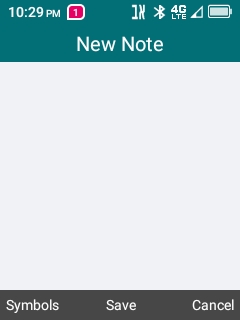
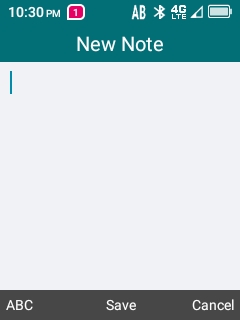
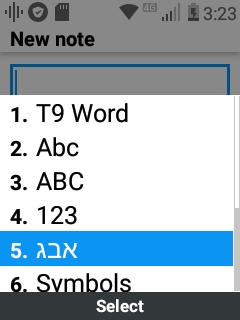
On the TCL it shows the selected keyboard option on the bottom left of the screen and it could also change by clicking the top left button like the default keyboard but the problem is when set to אב it shows it as symbol not as אבג so could you fix this that it should look nicer also maybe you could make that on the Kyocera and LG it should also show the keyboard options on screen?

a-one it's impossible. The MenuBar is a TCL thing, and is hard coded to be able to show only their supported options. I chose to use Symbols, as it is never shown in any other circumstance. In addition, on all devices, it should show on the notification bar and icon with current input. I do see the icon on some of your screenshots.

a-one

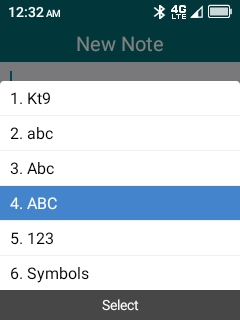
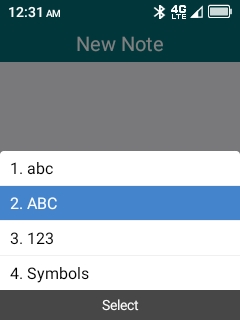
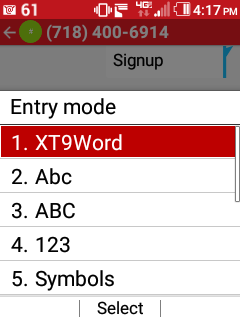
lionscribe on the 1st screenshot it says in the notification on top אב and in the bottom of the screen on the left Symbols in the 2nd screenshot it says in the notification on top AB and in the bottom of the screen on the left ABC and in the 3rd screenshot it shows how it looks when the default keyboard is selected and in the 4th screenshot how it looks when the HebKey is selected when clicking on the top left button to select an option and while selecting it doesn't show a notification on top because nothing is selected and it only shows when it is possible to type something and when selecting symbols when it's set to the Hebrew Keyboard it will show אב on top and type in Hebrew and not symbols so what does symbols have to do with אב it should rather say אבג instead of symbols like the keyboard that comes with some filters for the LG classic
screenshot from the LG classic

SamFried

SamFried @lionscribe Did some more testing, seems that the app is taking over full control over the # key, So the space in the default system keyboard stops working, Its possible to fix it?

OK, I just updated the AppLauncher app (v1.10), with a new feature, that it can also be launched by programming your phone shortcut key to go to "Portal" or "Homepage" (Set by default for the UP key on TCL phones).

AppLauncher.zip?usp=sharing

There are now 3 versions.
Use the Browser version for TCL Kosher Phones that have the Browser completely removed. It will show up on the launch screen with the Browser icon.
Otherwise, you can use the ATT version for TCL - Non-ATT - devices, that do not have the ATT DeviceUnlock App. It will show up on the launch screen with the DeviceUnlock icon.
Use the CTS version for LG Flip phones. It will not appear on the launch screen, but you can use the shortcut key method mentioned above.

BasicPhone

SamFried @lionscribe
Thanks for your great work!

Can you please fix it should work for the Kyocera?

Thanks a million...

BasicPhone SamFried a-one Biden2020prez
Ok. One, final (hopefully) update. Version 1.10 It now allows you to customize the key to use to switch between keyboards. It does NOT customize the key used within the keyboard to switch between types.
HebKey.apk

SamFried

lionscribe
Thanks a million! It works great on the Kyocera...

Just one minor issue from my end, that on the Kyocera And LG's the space button is # not 0 - So when im typing im always clicking # for space...

Its possible to change the space to #? I hope im not making you work hard...

Thank you

SamFried BasicPhone
How do you switch between modes (T9-ABC-123) and case (upper & lower case) on those devices?

SamFried

lionscribe
Modes is with the left soft key
upper & lower case is the * key

lionscribe
on the kyocera e4710
modes is the the middle (ok) button
upper & lower case is the * key

Flippy

BasicPhone I would also really like to have the space moved to #

How about an option to to swap the space key.

Does Middle Ok also work?

SamFried

klien its a 3G discontinued phone

SamFried

lionscribe
On the popular 4G flip phones like the Kyocera and LG's

Modes is with the left soft key
upper & lower case is the * key

SamFried Does soft menu button switch it, or show options?

SamFried

lionscribe
options

there is no way to switch with a button

And does HebKey currently show options on your device when pressing of menu key?

a-one

lionscribe BasicPhone SamFried a-one Biden2020prez
Ok. One, final (hopefully) update. Version 1.10 It now allows you to customize the key to use to switch between keyboards. It does NOT customize the key used within the keyboard to switch between types.
HebKey.apk

Thanks for this update it works great on the LG Exalt VN220 and Kyocera duraXV E4810
On the LG I'm using the the camera button for the switch key and on the Kyocera I'm using the voice command for the switch key because it's not used while typing so it works amazing.
And what about a-one that it should show אבג instead of symbols on the TCL when it's set to HebKey אב like the LG classic has with the K.C. filter.

MXRJR

lionscribe Ok. One, final (hopefully) update. Version 1.10 It now allows you to customize the key to use to switch between keyboards. It does NOT customize the key used within the keyboard to switch between types.

is there a possibility that u can allow a customized key to switch the keyboard and the same key will also switch the type? and like others suggested based on the use of the lg phone if u can make the space key #, as that is what we are used to.
thanks for your work!!

SamFried What does the 0 key do on those phones when in abc mode?

a-one

lionscribe What does the 0 key do on those phones

On LG when in T9 mode 0 is for the different words

SamFried

a-one but only in T9, Not in ABC-abc modes

GOLDFISH


it's a great game click on the image to download the app
SamFried

lionscribe

A Gite Voch!

  1. For me personally the ABC-abc keyboard is not vary important because i can always switch back to the default keyboard, The # for space is more important.
    But if you want maybe set the *key long press should change modes, and * key normal press should change caps.

  2. Just curious why is the keyboard speed so fast? if im waiting a half split second when pressing the same key its already typing the next digit... Is there even a possibility to make it a little slower?

Thanks again for your hard work!

Biden2020prez can you (or any1) repost the app it doesnt work

FliphoneBochur

GOLDFISH THIS GAME IS AMAZING! THANK YOU!
(Also Thanks for removing ads!)

BasicPhone

SamFried Good Points!
@lionscribe I think its not a bad idea to make a Hebrew only keyboard and change space to #. because for English you can always switch back easily to the default keyboard, Or like SamFried here wrotes about using the *key to change modes and also caps by long/normal press.

And about what he wrotes about the speed, its a little fast but its not so so bad...

3474336863

Is it possible on the vn220 to have this keyboard and the pointer work together?

FliphoneBochur

3474336863

lgexalter1 on the exalt you can't have two accessibility services running simultaneously

Sorry, but you need to choose which one you want.