
L-B I have tracfone service and my APN is VZWINTERNET
LG Classic Flip
So I don't know why multiple people at corporate were totally unable to help. I was able to fix this MMS picture/group message problem for one phone by porting out the number to google voice and then porting back. But it took a whole week to port back as google voice is considered a landline and therefore takes longer. I will try my wife's number by porting to Tello which should just take a day and I hope it will fix her problem too.
Porting out (at least to google voice) seems to freshen the number and erase its previous "baggage" so that it doesn't have this problem (just as a brand new number doesn't have the problem which I tested on same device (LG L125DL) same sim)
But you need an extra compatible phone for the service you are porting to and it costs some money to pay for minimal service on other plan (google voice costs $20 to port in)
UPDATE porting back and forth from tello worked!
Jumptoheaven so true. If you see your not getting anywhere, hang up and try again.

L-B try resetting your apn settings. And then text the word apn to 611611
Jumptoheaven what do I have to tell them when I call about the voicemail notification issue?
naftali89 you want them to enable voicemail notifications.
The first guy won't be able to help. He'll transfer to higher dept. Etc.
Jumptoheaven How do I ininstall the app?
klugs613 dial ##7764726220 press call. Then use service code 000000
Scroll down to installed applications. Find the app and uninstall.
Can someone spend a few minutes and answers a few questions. Their is a lot of information here in the forum and on the site, but it's very unclear what's about which phone.
1) put aside adb, with regular apk installation can all the apps work on the classic?
2) which app can be used to lunch all these apps on tne classic?
3) which app can used to navigate inside apps on the classic?
4) is their anyway to uninstall default apps like browser etc. without adb?
More to come...

Apper Here we go...
Any app needs to be modified to work on the exalt/classic, whether you install it with adb or not, the ones specified for exalt on the website or forum have already been modified. you need to use a menu/launcher to access the apps, you can use the exalt one from apps4flip. I guess what you mean to navigate in the app when the regular buttons dont help you can use voice access - also on apps4flips website. I don't know of a way to remove built in apps without adb, except for kosherappsforflip's program, which is basically with adb just more user-friendly.
....Phew! 🙂
Techgen I give you much credit....😏
Techgen
Thank you very much for your time, for some reason most of the apps dosnt work by me.
Apper I don't have the classic, you can ask about specific apps, maybe someone who has the classic will be able to tell you if it works by them
Yms Interested, I thought they only have the Verizon version? How you using it on T-mobile? The bands are compatible?
Only classic flip that's good for T-mobile was the Walmart family mobile device.
Yms Unfortunately contacts has stopped when I click to ''go' in the contact, after downloading that apk file and adding it as a contact as the web browser.
Any other ideas?
yk9813 Cool That worked, i guess that's the same as finding that contact and clicking go on that website. Thanks.
Jumptoheaven What should it look like? when running the command?
Jumptoheaven Found it with the auto apk installer thanks though.
T-K First download the apk to your computer.
You can find it here...
c36764_94adb6f8eaca4b2d9bf7fb3d55513d15.zip
or go to the website and get the app.
https://kosherappsforflip.wixsite.com/kosherappsforflip/lg-exalt
Then go to this page
https://kosherappsforflip.wixsite.com/kosherappsforflip/instructions
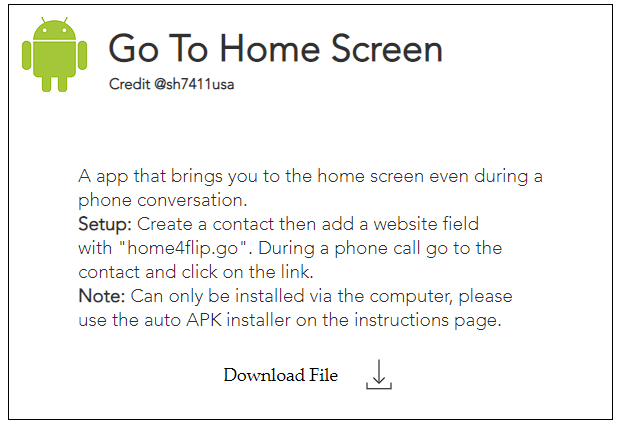
and install auto apk installer on the top and run it and find the file you want to install and it should work flawlessly. make sure to make the contact and add the webpage like the app says to do the website.
At first it didn't work and then i got it to work after trying this second way.
or you can do the trick by making another call and closing the phone to go to the home page and still be on the phone with your original phone call, you can toggle with the speakerphn button.
Here's what's needed to be done on the contact.
ksav Make sure you have a thick wire and the usb debugging is enabled. A cheap wire will not work.
T-K JUst use the auto installer to install the apps without any work on your end.
btw for the lg classic flip not all the apps will work, youll need to go to apps4flips.
not this site..
https://kosherappsforflip.wixsite.com/kosherappsforflip
Yms That much i know, but what service provider does it work on? i thought the only one which is gsm branded was the lg classic flip from walmart family mobile?
Also the wine2 is a pain to get a hold off, i tried every zip code possible, still looking to get a few of those.
on ebay i saw some for 90$, curios what you paid for it?
As well it seems you can get these unlocked as i saw a picture of someone selling the lg wine2 unlocked for $150.
Myi i called Us Cellular and they told me they dont lock it.
I have T-Mobile it works fine except that on a call it says 4G not **4GLTE**
Yms interesting, would love to know the bands of the device?
Any issue with a phone call, being not clear or choppy?
Myi How? Once the auto installer is installed, how do I load on the apk that I downloaded?
Did you do this for the LG Classic?
T-K Yes I just did this a few hours ago.
First download the app on your computer that you want, and extract it from the Zipped file so you can can find it when running the auto apk installer.
Then once you run the auto apk installer it will ask you to find the apk you want to install and then set up the contact and all. It should work flawlessly.
Post back if you still need help.
T-K just run the auto apk installer and it will be self explanatory.
It will ask for the file and make sure you know the location and it's unzipped.
And of course a good wire to connect your phone to the computer and usb debugging is enabled.
If all the above is followed you should have no issues.
Myi yes, that was the issue forgot to check off usb debugging on my phone. said install was successful
Thank you for explaining so clearly!!
T-K You're so welcome. Glad to be of help.
I know the feeling spending hours and not getting anything to work. I've been there did that and done that.
There's many great websites out there for info on how to download and install apps and all.
Managed to play around with all the sites l, se of the sites,whiel that way I meantioned was definitely the easiest from all if your not so tech savvy running the cdm commands and executing the correct command.
This forum is a great place, just bumped into it today.
Was always asking my questions on the dansdeals forum for these issues. Didn't always get my answers I needed so had to look on my own for answers.
Here's a thread from very beginning playing around with the cdm commands..
T-K For which app do you need that.
I'm trying to get the cursor that this guy seems to have released. Once I can break down the apk file and see what it has to create a cursor hopefully we can get one for all our apps.
See here..

Anyone knows what the points on the profile is, how to earn it and what do we have from it?
Myi T-K For which app do you need that.
I'm trying to get the cursor that this guy seems to have released. Once I can break down the apk file and see what it has to create a cursor hopefully we can get one for all our apps.
See here..
https://forums.dansdeals.com/index.php?topic=119773.msg2366271#msg2366271
Though the Waze on the classic has a cursor I can't seem to scroll down on the app and can't seem to select anything. Only with the Waze destination app works.
T-K Didn't try, but many of the apps that were made for the Kyocera and or the Exalt didn't seem to work when trying to install on the Lg classic.
Gratitudetocreator Just to know what you post and who you are, reliable and ...
No you don't get a cookie for behaving.
Myi I figured. Just trying to figure out this platform. I joined earlier today...
@Myi are you tech savvy? I need help with my sonim xp3
Gratitudetocreator post here.
Many here are pretty knowledgeable.
Make a new post if there's not one already.
I know a bit but not enough to answer every question.