All Discussions
  • KAZUNA eTalk - App Guide & Discussion

Started by yeti · Oct 11, 2021 · Page 1 of 3
yeti

I'm not sure what I'm legally allowed to share while under an agreement with TAKUMI JAPAN 株式会社.
Additionally I am not responsible for ANYTHING you choose to do with your device.

If you choose to modify your device, you risk permanent damage, and most likely void your warranty.

Working USB Debugging through ADB is in fact possible, under specific conditions.

There is some limitation placed on the USB debugging authorization prompt on some firmwares.

this limitation is present on the prepaid version's (KAZ-F019) software version F019_R031 but is not present on the postpaid unit (KAZ-F119) version F119_R024.

It is possible to flash a prepaid KAZ-F019 to a postpaid KAZ-F119 if you can locate the firmware package

this can be done using either the Qualcomm Flash Image Loader (QFIL) or through Verizon Software Upgrade Assistant and a bit of quick thinking during the download phase right before the device is "repaired".

I can not guarantee that everything will work as expected after flashing your eTalk as the postpaid variant.
They dont seem to have any meaningful differences between the two save for software version but you can never be too cautious.

If you do decide to go this route, backup your IMEI, because recovering it is a real pain.

My particular unit was purchased as "unlocked" and still detects my SIM correctly but your mileage my vary.

Enabling Developer options and USB Debugging:
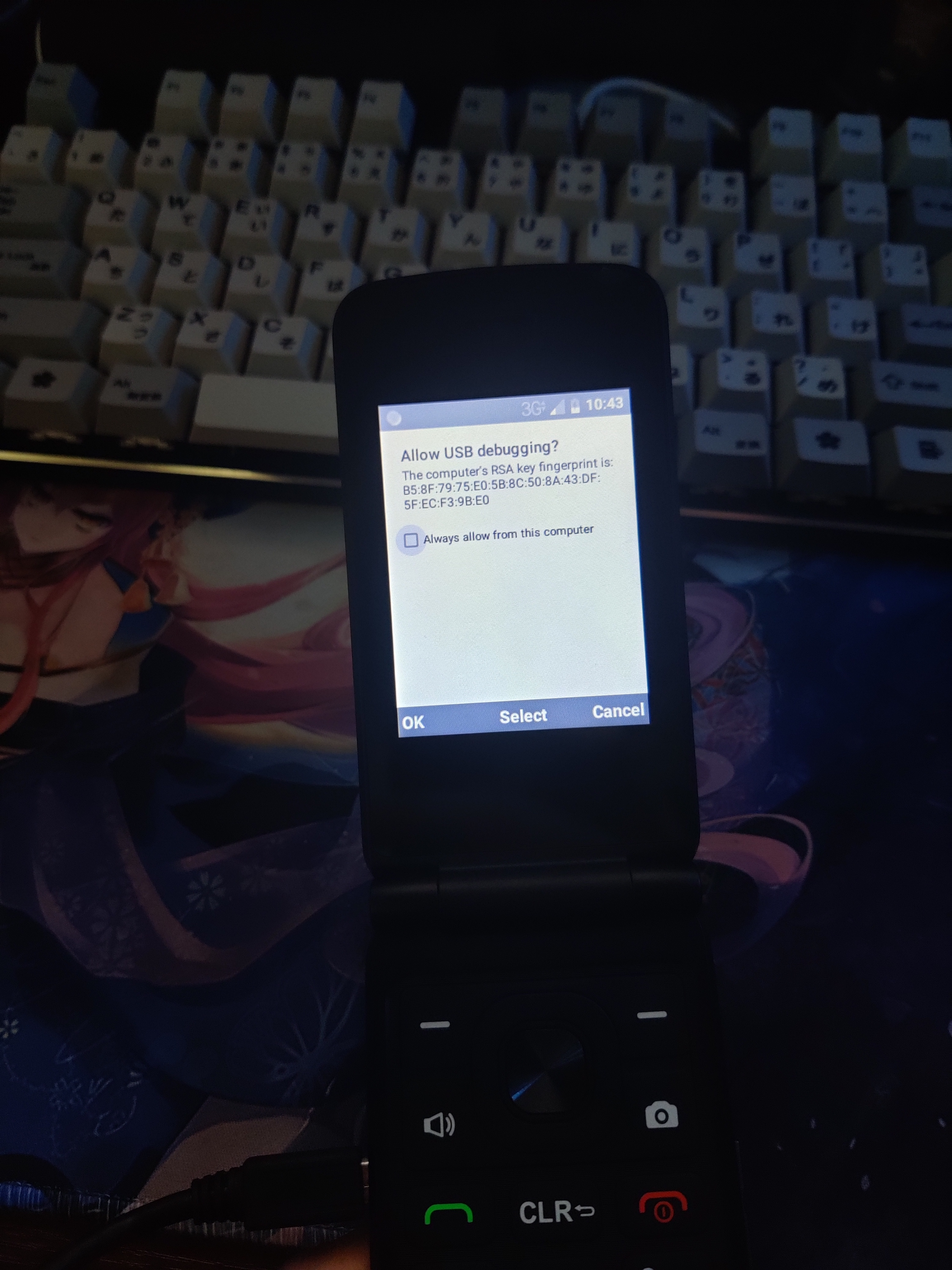
Authentication pop-up

  1. Launch the Engineering Mode app by inputting the dialer code: *#*#825864#*#*
  2. Click on Developer Options, and toggle the category to make changes.
  3. Scroll down to USB Debugging and toggle it.
  4. If you have and ADB server running you should see your computers RSA fingerprint. You can select "Always allow..." and click OK.

You now have working ADB access and can install any supported application.

Note on application support:
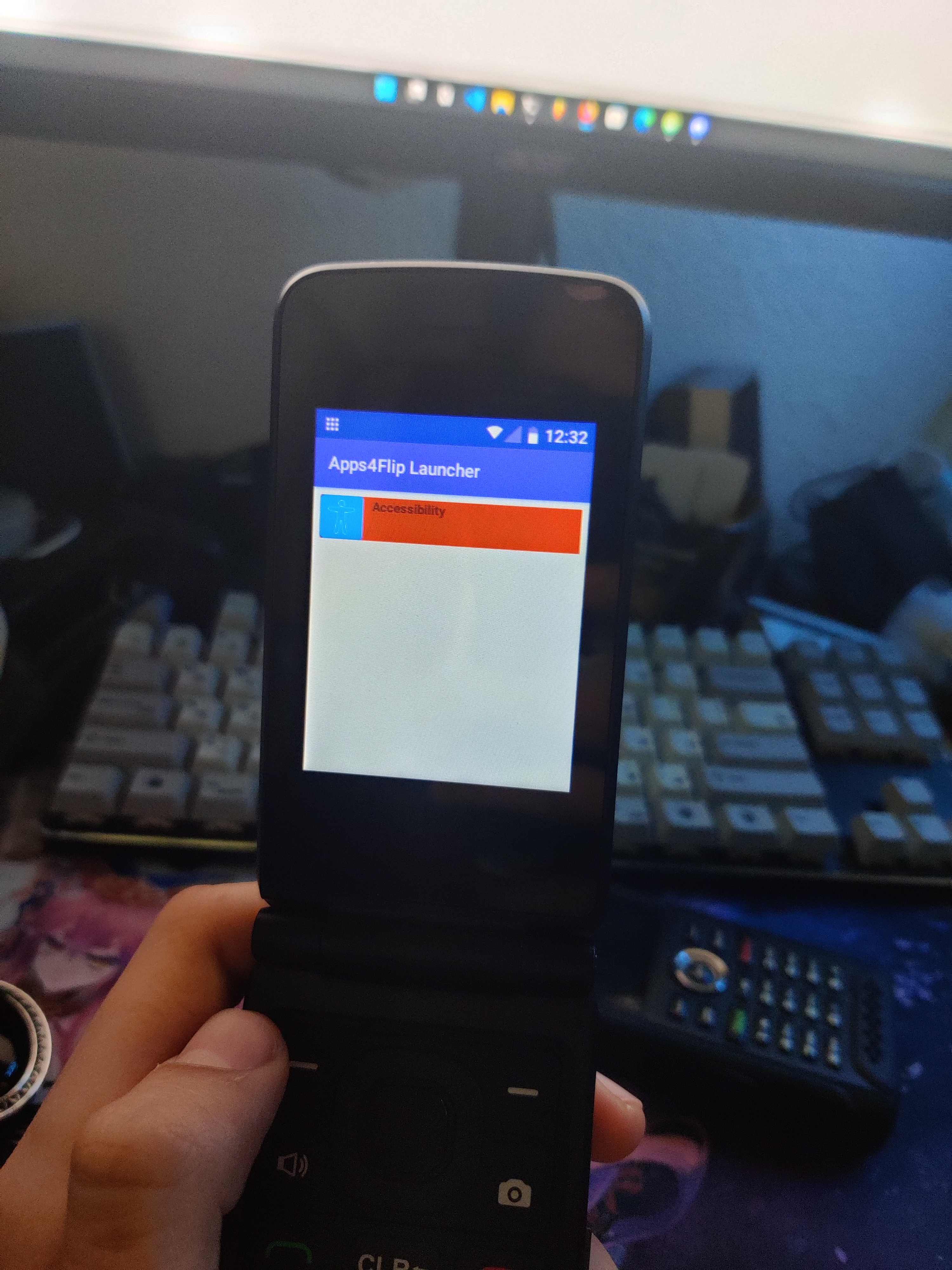
Apps4Flip launcher

The eTalk seems to share common DNA with the LG Classic Flip so anything that runs on it should run on the eTalk as well.

if you choose to install the Apps4Flip launcher choose the one for "LG Classic Flip"

There is no restriction on the application's namespace or signature and I was able to load a wide variety of apps, though I was limited by the devices general hardware.

The accessibility enabler app xxdeafgirl shared works like a charm, as does list launcher.

Misc findings:

QDLoader 9008 Mode - Hold Volume Up while plugging it into your PC.
EDL Deep Flashing Cables work too.
Recovery - Volume Up while booting (not much to see here)
Fastboot - Volume Down while booting (or here for that matter)

Treble Compatible
Still working on getting a custom recovery working (hopeful), or unlocking the bootloader (less hopeful) but once we do, it should be possible to completely replace the version of Android with a custom one. Maybe even KaiOS...

FM Radio
I believe the FM Radio to be enabled across all eTalk models, we just need an app to utilize it.

Factory Test Utility
There is another factory test utility, this one baked into the boot image itself.
It's accessible by holding both volume buttons while turning the device on.

Nothing particularly interesting here. You might not even be able to reboot out of it.
2/10 would not recommend

Wrap up:

Hope you found this helpful or at least interesting. Let me know if any other mysteries pop up.

Cheers,
Dan

yeti

reserved

Apps4Flip-Admin

Super Impressive work, keep it up and thanks for contributing this!

And I bought a Cricket Debut Flip. I wanna get an ETalk and see what I can do, I bet this is another S-OFF device that can be flashed with EDL.PY
EDL.PY download
Also, that archive has a firehose.

yeti

now that the cat's out the bag, lets have some fun.

fembycat they left the url for their firmware directory in a plaintext file.
Almost feels like they wanted people to find it lol.

xxdeafgirl yep EDL.py works great.

System isn't ODEXed and the java isnt obfuscated so I've making some small quality of life tweaks, repacking the image and flashing it.

Maybe we should make a Discord to pool our efforts?

Edit:
Here's a Magisk patched boot image to save everyone some trouble.
Google Drive link

Apps4Flip-Admin

This is massive, Just ordered one and going to try to create some custom firmware mods for this group.

yeti

I've been in contact with TAKUMI for a bit, and am trying to secure the kernel sources (hence why I wasn't allowed to specify the firmware location). Once those are on lock, this might be the most open smart flip-phone to date.

Also kinda hard to say outright but it's happened to me, The device has decent support on GSM carriers, and may already be networked unlocked.

I bought a second eTalk off ebay, a postpaid model and when I popped my metro by t-mobile sim in and ran the Search networks tool, I was able to associate the device on Metro and have been using it as my daily driver for the last few days.

Not sure if this applies to the prepaid as well, or maybe since this one was paid off It unlocked on it's own when I put in my sim.

Apps4Flip-Admin

Kernel sources are protected under the GPL, you should not have a hard time getting them.

So far it is looking like the E-Talk is the most open modern flip phone on the market, I would love to dig deep and debloat it a bit to speed things up, that would be a huge improvement, but alas I can't find the time yet.

Hopefully will have time soon.

yeti

lgexalter1 As far as I know, they are all the same device.

If you're referring to the network unlock status, again take what I said with a grain of salt. It may have been a fluke or something specific to the postpaid variant (KAZ-F119).

I frequently see the eTalk listed as being made by Freetel but I really think this is a mistake of some kind. Freetel does make flip phones for their home market (ex: the Musashi, and the Mode1 Retro), but I haven't found a significant link between the two.

I've yet to see one turn up as a TCL though. I suppose it's possible that TCL manufactured the device for TAKUMI株式会社, but I don't think that's the case as the Alcatel GO FLIP V on verizon runs a very different fork of Android. Something much more inline with ZTE's latest offerings.

The eTalk was definitely ODM'd by a Chinese company but outside of references to Wy, China Mobile and Borqs I have no idea who made this device. If we figure that out, we probably also solve who LG licensed their devices from.

yeti LG didn't license their L125s from anywhere, it's based on a past smartphone platform and it's not an ODM phone like 80% of the other flip phones.

yeti

xxdeafgirl I figured that LG would do their manufacturing in house. I just find the software similarities, button layout and camera position curious when you compare them side by side. Perhaps the eTalk was lisenced from LG then.

I have a feeling at least the software base for both devices were sourced from same company, even if the actual product development happened internally.

Similarly to how both the Kyocera devices and the Schok devices run software derived from the same set of patches (I believe they originated from Borqs).

Actually, most flip phone designs now are all based on each other visually but the internal layouts are gonna be different and will vary wildly from OEM to OEM even if they look similar outside.

The Schok flip looks interesting but $100? That's a lot for me, but if I can obtain one, expect greatness.

yeti

xxdeafgirl Yeah I see what you're saying now. I just compared the main boards and outside of the camera and speaker modules, not a whole lot matches up. :/

darth

I have a KAZ-F019 and have been trying to flash the firmware that fembycat posted to get it to the KAZ-F119. I have been using QFIL but when I try downloading the firmware to the phone I get the Sahara Fail error. What is causing that? If I wanted to flash it using the Verizon Software Upgrade Assistant which one should I use? (It looks like they have a different one for each manufacturer but I couldnt find one for Kazuna)

yeti

darth

Idk if you use this device with service or not, but you might want to backup your QCN first. It stores your IMEI and MAC addresses as well as a few other things that aren't easily recoverable. While the eTalk is on, plug it in and you should see it in QFIL as HS-USB Diagnostics 9091. Go to Tools -> QCN Backup Restore, choose where to make the backup and click Backup QCN.

1.
that's interesting. Which Sahara Fail error are you seeing?

Make sure that the firmware package is in a path without spaces (ex: D:\Firmware\20190506R024_postpay_user)

If you're using QFIL standalone, you might want to try installing the full QPST Suite. I had problems with the standalone versions.

These are the ones i'm using.
QPST
Qualcomm USB Drivers

2.
The Verizon Software Upgrade Assistant is actually bundled with the device. If you turn the device off and plug it in, it will expose itself as an installer drive.

follow the steps on the tool, and right before it starts the repair, delete the filed in the firmware folder it unzipped on your drive and replace them with the one fembycat posted.

yeti

Here's a quick update on what I've been working on.

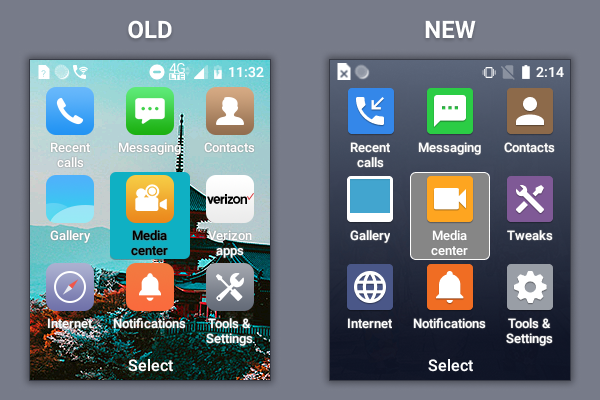
The launcher felt unfinished to me so I've been trying to improve the overall UX. I added in a background to the drawer to improve contrast and gave it a fresh coat of paint. Icons aren't 100% finished yet but I think they feel more appropriate for a basic phone.

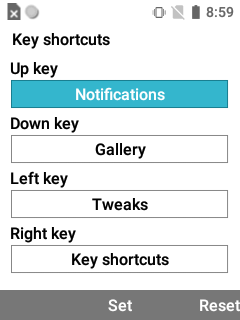
The Verizon menu has been replaced with a Tweaks menu, that includes a shortcut to a little app drawer I'm working on and to a cool hidden key shortcut settings menu I found.

Here's a pic of that:

I'm also working on a simple flash-tool with GUI based on EDL.py that would allow a user to install a custom firmware package safely onto the eTalk without advanced knowledge. More on this later...

Cheers

darth

yeti I used your QFIL from QPST and your drivers. It downloaded successfully but now my phone is in some sort of bootloop/bricked. When I power it up the screen turns white than blinks and goes black and repeats... Now when I plug it in to my computer it shows up as HS-USB Diagnostics 900E (COM24).

yeti

darth Well that doesn't sound good.

This is the link to the Verizon Software Upgrade Utility

Install it, reboot your pc and run it. It should be capable of detecting the device and switching it back into flashing mode.

if not, you'll need to either make or procure an EDL deep flashing cable.

darth

yeti If I plug on with holding volume up it goes into downloading mode. It just doesn't boot into any operating system when I try powering it on, even when I tried flashing the firmware again (again said it was successful). I have the ability to download to it just I am having issues with the results of the download...

yeti

darth That's very strange. You didn't alter any of the settings on QFIL did you?

Unless you have a hardware variant we haven't seen yet, the next most likely culprit could be some kind of corruption.

Here's the firmware for the KAZ-F019 prepaid https://kazuna.co.jp/dl_files/KAZ-F019/20190430R024_prepaid_user_fuse.zip you can try flashing that or try your luck with the Verizon Update tool.

This is absolutely golden! I don't have any money right now, but I might pick up one of these and if the BL can be force-unlocked, I might build some ROMs for it.

FATANG

So I snagged one of these from ebay, NIB KAZ-F119

yeti but is not present on the postpaid unit (KAZ-F119) version F119_R024.

This is an eTalk post paid unit but the software version (build number) is F119_R030 and it's never been updated via Takumi nor Verizon. Any thoughts on this?

It lists:
Kernel version: 3.18.71-perf (gcc v4.8)
Hardware Version: F1_MB_1V2
Android Patch Level Dec 5, 2019
Android v 8.1.0

yeti Launch the Engineering Mode app by inputting the dialer code: ##825864##

This isn't working for me with the phone plugged in or not plugged in to my computer, even with a SIM in it (never a Verizon one). Is there another way to do this? I set it up as MTP under the >USB connection menu since the dialer code wouldn't work. Maybe it's build # specific?

yeti I bought a second eTalk off ebay, a postpaid model and when I popped my metro by t-mobile sim in and ran the Search networks tool, I was able to associate the device on Metro and have been using it as my daily driver for the last few days.

Can confirm for the F119 T-mobile SIMs work, it also works with a Tello SIM and a Redpocket SIM (CDMA/GMST), they seem to be unlocked from the factory. The only snag I had was a need for an extra reboot after swapping SIMs. It goes a little wonky after recognizing the new SIMis different than the old one, but everything is fine after the 2nd boot.

yeti a cool hidden key shortcut settings menu I found.

It takes a minute to get to this:
Menu>Tools & Settings>Phone Settings>Key shortcuts

yeti I added in a background to the drawer to improve contrast and gave it a fresh coat of paint.

Neat.

yeti

Oh good there is still some interest in this device.

FATANG This is an eTalk post paid unit but the software version (build number) is F119_R030 and it's never been updated via Takumi nor Verizon. Any thoughts on this?

I don't have this version in my archive, if possible I'd like to snag a backup of it from you.

The only build known to have working ADB access is the postpaid's F119_R024, but you can try dialing *#*#2016#*#* and clicking on the button that says 打开开发者选项 this enable developer options which you can access from the notifications while the device is plugged into a PC.

FATANG Can confirm for the F119 T-mobile SIMs work, it also works with a Tello SIM and a Redpocket SIM (CDMA/GMST), they seem to be unlocked from the factory.

It's cool to know that at least the postpaid units are factory unlocked.

FATANG It takes a minute to get to this:
Menu>Tools & Settings>Phone Settings>Key shortcuts

Wow now I just feel stupid.

FATANG Neat.

I was working on a custom firmware but lost interest, but I still have the decompiled F1Launcher source if someone wanted it.

I gave up on getting the kernel source from TAKUMI and my Japanese isn't nearly good enough for me to write a GPL compliance letter.

I have been looking at the kernel source for the LG classic flip, and they are the same version and CAF release tag so I think I can get it to boot on the eTalk with a bit of tinkering, just not sure how many of the important bits will work without patches.

FATANG

yeti I don't have this version in my archive, if possible I'd like to snag a backup of it from you.

Sure, as soon as I figure out what I'm doing 😃

yeti but you can try dialing ##2016## and clicking on the button that says 打开开发者选项 this enable developer options which you can access from the notifications while the device is plugged into a PC.

This absolutely worked, what it does is auto-enables USB debugging. When you go to the notifications menu (Menu>Notifications) it allows you to "click to disable USB debugging" When you click it, it disables USB debugging and then automatically puts you into the developer options menu which is far more kino than most developer option menus.

It includes: Bluetooth HCI Snoop log and packet capture, a 3/6/12/24 hour memory log, Double password, Stay awake while charging (which includes while plugged into a PC based upon your USB settings), Bootloader unlock, Color Modes, Web View Impl, Automatic updates, Bluetooth and WiFi/WLAN options, and the standard Developer options of Running Services, Hardware, Drawing, and Debugging,

The only running services when OEM are:
Tools & settings, SimContacts, com.qti.diagservices, Kika keyboard, Kazuna Home, CellBroadcastReceiver, and com.qualcom.qcrilmsgtunnel service. There is no background processes even if you load a memory card and media and no bloatware that I can find running but it will not let you disable MyVerizon or Verizon Cloud except through "No background processes" under the Developer options.

There is an option for "Force allow apps on external" to "Make any app eligible to be written to external storage regardless of manifest values" which is going to be fun...

yeti I have been looking at the kernel source for the LG classic flip, and they are the same version and CAF release tag so I think I can get it to boot on the eTalk with a bit of tinkering, just not sure how many of the important bits will work without patches.

Honestly if there is a way to pull off the verizon software that would be all that is needed aside from visual tweaks per each users needs and an FM radio. The camera on this thing isn't even that bad.

I didn't have any 32 gb memory cards laying around so I ordered one so I can test what kinds of media I can get it to play and also another F119 so I can brick or fry one of these while tweaking it and not feel so bad.

yeti I was working on a custom firmware but lost interest

Legacy OS might be a valid option but I dunno if it's needed, this thing only used 20% of it's battery idling uncharged for 5 days.

yeti I gave up on getting the kernel source from TAKUMI and my Japanese isn't nearly good enough for me to write a GPL compliance letter.

So I dunno how you were doing this, but under Menu>Tools&Settings>About Phone>Kernel version it lists the following info that might help:

3.18.71-perf (gcc version 4.8 (GCC) )
kazuna1@ubuntu5 #1

yeti Thanks for all the info i installed the launcher but can't see it, how do i bring it up?
Thanks

Biden2020prez

yeti Bump. Does that mean the you have access to the full APK for the launcher (including the classes.dex)? Can anybody with an eTalk post the APK and I'll try to make a version for the LG phones. Thanks!

yeti

Biden2020prez correct. porting the launcher might be a bigger headache then it's worth though.

here's the decompiled source for the launcher with a bit of makeup applied to it and the non-Verizon sim message nulled out. reassemble with your favorite apk compiler if you're into that

https://file.io/kYQqr3PMmEgC

Biden2020prez

yeti Thanks! I'm very excited to check it out. (Is it your version or the stock?)

Biden2020prez

Biden2020prez I really need the apk b/c the apk app I use on android doesn't open decompiled projects. (The apk compiler on pc had errors compiling, usually android works fine in those scenarios)

Biden2020prez

And More Importantly, did you ever backup /system or /system/priv-app or wherever the apps are saved on this phone. If so, please send it.
I had an eTalk without a battery, and with much heavenly assistance I flashed it to Kaz-f119! (I am ordering a battery)
can you send me any email: biden2020prez@gmail.com or post your email so we can communicate quicker?

yeti not working for me

Biden2020prez

ekjr Welcome to Apps4Flip Forums!
I don't know what you mean by

ekjr not working for me

If you can explain your issue in more detail it will be a lot easier to help. Thanks!

how do you get that pop up that says allow usb debuging

Biden2020prez

Oh. Great question, it can be confusing sometimes. If you have the Kaz-F019 model, it won't work. You need download:

You need to install the Qualcomm Drivers and QPST, then open QFIL (just search qfil from start), plug in your phone, and flash the KAZ-F119 Firmware. You can probably find instructions by searching google for "How to flash new firmware with QFIL". However, if you are having issues, or it's too confusing, I'm happy to help out more.

Note: Doing this will delete all your phones data!

(If you have the KAZ-F119 model, you should be fine already. You can check by going to Settings > About Phone)

QFIL says "no port available" when I try flashing the firmware on my phone

Biden2020prez

ZTEGuy Try powering off the phone and holding volume up when you plug in the USB. Let me know if it works.

It still says no port available, and does not let me press the download button

never mind, was just a bad cord. works fine now,

It kept giving me a sahara fail error, so I used the verizon software upgrade assistant, and now my phone is bricked

darth

ZTEGuy I had similar issues darth I didnt look into it much but if you resolve the issue please let me know

It seems to be turning on and functioning, just the screen keeps looping white except for a small strip which changes as the phone turns on. I have tried flashing it with both the prepaid and postpaid softwares. the Verizon software upgrade assistant tool fails to recognize the software version of the phone.

Biden2020prez

ZTEGuy Are you using a standalone version of QFIL, or the QPST one that Yeti posted?

I am using QPST

Biden2020prez

Did you install the Qualcomm Drivers?

(If you have another computer to try it on, that may be helpful. It took me 3 computers until I got it working - But I had a different error)

Yes I did install the drivers

ZTEGuy

Hey ZTE guy, before plugging in your phone to the USB cable try running QFIL as an administrator on your computer and then connect up the phone.

Biden2020prez
What are the benefits of flashing to the F119 firmware for an F019 phone? I'm currently using an F019 as a backup phone while I wait for a new Pixel Pro and i've become rather smitten with the classic flip phone design. I would love to be able to at the very least install slack and/or sync to google for my contacts so I can read messages sent to me by work colleagues.

drbeast The benefit is that the F119 has allowed adb

ZTEGuy

Yeah that's a pretty big benefit :xD

Hi friends,
I've been able to get my F019 connected via QPST to show the QDLoader 9008. I can even get the build type ready to go as well, but I'm not able to get the QCN backup to work.

I can see in the status it's saying, "Invalid SPC Code, ignored".

Curiously, 00000 is not working. Does anyone have any advice? I bought this over ebay awhile ago and it works well with my verizon sim on a prepaid account. Could it be the last 4 digits of my IMEI ?

Edit: are you guys using windows 10 or 11 for this? I'm wondering if there's some sort of driver conflict going on.