
esaphire3 disagree
Ping Pong Room

Because you dont like the phone or because it doesnt work on t-mobile
I have it on Ultra mobile which is a sub of t-mobile and its working fine
esaphire3 You can get them on eBay for around $100

Can somebody with an LG phone please help me test these empty app/projects on your phone and let me know if and which works?
Thanks.
Test #1 [https://drive.google.com/file/d/1lSFIMy1pEkGzVCm8iU64F4MEPfUs1jiM/view?usp=sharing (Google Drive link no longer available)](https://)
Test #2 [https://drive.google.com/file/d/1a4AfIxmEeBEw4EmgTLRGdoks77FSMmQ4/view?usp=sharing (Google Drive link no longer available)](https://)

is there a way to route mobile data through a dns server on a android os
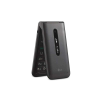
LG Exalt vs. LG Classic
Which is better for its speed, battery life, user friendliness, built in apps (does one have a useful feature that the other is missing) overall quality etc. (not asking specifically about kosherability)
It seems the exalt costs much more. Is there a good reason for that?
PS I have the classic that I paid $20 for and I'm very happy with it
L-B It seems the exalt costs much more. Is there a good reason for that?
The reason is that they are discontinued by the manufacturer, a lot of people want the UN220 because it has message+, and a lot of people want the UN220 because its GSM unlocked.
L-B Which is better for its speed, battery life, user friendliness, built in apps (does one have a useful feature that the other is missing) overall quality etc. (not asking specifically about kosherability)
I've used both the Classic and the UN220. The UN220 has a bigger screen, feels much more premium and is much smoother to type on. The only Con is the lack of an external screen.
TryingToBeHelpful thanks
ChapsTheMatzav No unfortunately not at the moment. Maybe I will try to do it android possibly.
Hi, I filterd the gallery from the Kyocera e4610 it shouldn't have video and when I wanna install it as a update to the regular system app it said that the signature doesn't match so anyone knows how to sign a app with the system signature.
Check out the new music video about smartphones released by 8'th day and Project Focus "Look Up"
https://jewishtidbits.com/project-focus-presents-8th-day-look-up/
FetehShmeel
It's 4G but unless the software is updated to the most recent version (1.215AT) it won't properly pick up 4G signals, despite having the proper bands (at&t is great at being annoying...)

esaphire3 Where are you located? I know people with UN220 on Ultra, and they had ultra-poor reception...
efshernisht Are you referring to the DuraXE E-4710 Or DuraXE Epic?
Flippy
The DuraXE E4710
efshernisht I have software version 1.120AT and it says no new update available....
Flippy
According to at&t's website the newest version is 3.13AT. They have a list of 4G/5G eligible devices on their website, and this model is on there, but says that it will only work with the latest update. The only way to get it is if you have an active at&t SIM. If you do have at&t and it still won't update, just chat with them on their website and they can push the update to you. If you don't have at&t there doesn't seem to be any workaround... lmk if you have any luck please.
efshernisht OK thanks. I was trying via Wi-Fi. I did try for a few minutes with an AT&T SIM, and it did seem to work fine, but that was short term, so I dont know if AT&T would've shut it down after a while...
Flippy
I spent a while looking through at&t customer service discussion boards and it seems like everyone who was able to get the last update has had good service since then....
efshernisht
I just got an AT&T prepaid sim (cost me $20) and after chatting with tech support they were able to push the most recent update to my phone. Seems to be working fine now (reception-wise).
Check out this new music video about smartphones from Rav Yoel Roth:

I thought this was a useful tip that people would appreciate, but I didn't think it was worthy of its own thread.
If you have a bunch of APK files in a folder, and you want to find out the package name of all of them without having to open each of them, you can use this tip:
Download aapt.exe and put it in the folder of the APK files that you want to see the package names for.
In that folder, type
cmdinto the address bar to open command prompt to that location.Run this command:
for /f "delims=" %i in ('dir /b /on *.apk') do for /f "tokens=2 delims=: " %j in ('aapt dump badging "%i" ^| findstr /r /c:"^package: name="') do echo %~ni %j >> output.txt
You should now have a text file called output.txt in that folder with the filenames followed by the package names.
Here's how the command works (taken apart by ChatGPT):
- The
for /fcommand is a loop that iterates over a set of items. In this case, it's used to iterate over the list of APK files in the current directory. delims=specifies the delimiter to use when parsing the input. In this case, the delimiter is set to an empty string, which means that the entire line is used as the input.%iand%jare variables used to store the current item in the loop.dir /b /on *.apklists all the APK files in the current directory, using the/bswitch to output only the file names and the/onswitch to sort the list by name.aapt dump badging "%i"is a command that extracts information from an APK file.%iis replaced by the name of the current APK file in the loop.^|is used to escape the|character, which is a special character in the command prompt.findstr /r /c:"^package: name="searches for a line in the output ofaaptthat starts with "package: name=". The/rswitch specifies that the search string should be treated as a regular expression.tokens=2 delims=: "specifies that the second token (the package name) should be extracted from the output offindstr, using:and space as delimiters.%~niis used to extract the file name of the current APK file in the loop, without the file extension.>> output.txtredirects the output of the command to a file called "output.txt", using the>>operator to append the output to the file.
Hope this is helpful!
FliphoneBochur Slightly less intense method, and overall cool program:
Quick Look
on Github or Microsoft Store
is an amazing free app that lets you press spacebar over any file to preview it. Works on photos, text documents, PDF etc. Also works great for APK package names...
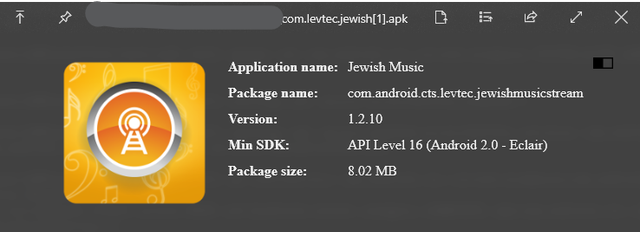
Flippy Thanks! Very useful. I'll probably use that a lot!
The מעלה of the program is that it's less intense, and the מעלה of my command is that it works in bulk.
Flippy You didn't mention that you have to install the APK plugin for the app to show full APK info. Installation instructions on bottom of that page.
FliphoneBochur Yes sorry forgot if it was a separate plugin or just a later update. Thanks for mentioning. Once your at it, grab the office viewer plugin too.
Flippy Thanks! It's great!

I wasn't sure where to post this, but as the admin said, this is:
Apps4Flip-Admin The place to talk about anything random.
I won't be active on the forum for the next 2 months as I will be in camp. I might be able to get on for a bit and post on off-days or visiting day, but for the most part I will be inactive. I have been working on a big project for the last 5 months that I wanted to release before the summer, but I haven't had time to finish it off. I plan on releasing it (and the filter for the Orbic) after the summer.