All Discussions
  • Sonim XP3-Kashering, Tips, Tricks And Buying Guide

Started by chaimontherun · Apr 21, 2021 · Page 1 of 2

Please Note: This post will not look normal unless you are logged in to these forums. Therefore please login to the forums if you would like to see this post with all the links! You can create an account for free.

The Phone:

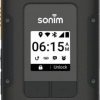
Waterproof, Shockproof And 8HR+ Battery life. Click Here for pictures of the phone.

When buying the phone directly from your carrier Sonim gives you a 3 Year warranty. You do not get this warranty if you purchase the phone on eBay.

Updating The Phone-Do this as soon as you get the phone:

Go to settings, scroll all the way down to system, click system then scroll all the way down to system updates, and then click on update firmware. If a new update is found you'll get a prompt to update the phone. The update will install and then it will give you an option to restart the phone.
You may have to update the phone a few times to get to the current version.

Testing The Phone To Make Sure It Works

Click here for pictures.

Open the Sonim Scout app. (Your phone may have tp be updated for this app to appear), then go to the support tab and click on Sonim Care, and then click on Self-Diagnosis test. You will now have the option to test various features of the phone. In my experience, the most important thing to test is the vibration.

Kashering-When Using WebADB (These commands have worked for me on the Sprint version-they should also work on the AT&T version as well)

WebADB Link

(Some of these commands will only work if the phone is fully updated-see previous step)

pm uninstall -k --user 0 com.android.browser

pm uninstall -k --user 0 com.sonim.sprintauth.sprintvowificalling

pm uninstall -k --user 0 com.android.quicksearchbox

(This will remove Wi-Fi calling as there is a loophole through that package-simply removing the browser will not do the trick)

Installing Apps:

First Enable developer options and USB debugging, enter Star Pound, Star Pound 2387 Pound Star, Pound Star

Simply use ADB to put on apps the way you normally do-All of Apps4Flip's apps work-Besides for the new Hebrew keyboard and the mouse for the LG classic.

You can get a mouse for the Sonim XP3 Here. See also this.

Where to get the phone:

You can get the phone Directly from AT&T for $189, Directly from US Cellular for $199.99 , or you can go the eBay route.

Buying the phone on eBay:

While buying the phone on eBay is significantly cheaper you do not get the 3-year warranty offered by Sonim. Therefore I would recommend that you buy a Square Trade Warranty when buying the phone on eBay. A Square Trade Warranty is usually pretty cheap and super-easy to make a claim. To buy a warranty simply click "add plan" when prompted on eBay. See this picture for how to add a plan.

Get the phone on eBay:

Note: I am unaffiliated with all these sellers and take no responsibly for any issues with them.

Sprint:

Brand New for $58.99 With Free 60-Day Returns

Used-Grade A For $29.99 With Free 30-Day returns (I have bought from this seller a few times and was always satisfied.)

AT&T:

Open Box For $129.99 With Free 30-Day Returns. (Based on the description it looks like its used-not open box)

Verizon:

Open Box For $119.95 With Free 30-Day returns.

Click Here to view all Sonim XP3s available on eBay.

Further Reading:

To make the screen less cramped Click Here Credit: @Techgen

If you have any questions drop a comment below and ill try to help you!

chaimontherun
which carrier can I use on it?
and is this locked for such a period of time to any carrier?
can TAG or other filtering services block this phone?
is this a basic phone or a ..... ?

mg5077 which carrier can I use on it?

You buy the phone for the carrier that you want. What carrier are you looking for?

mg5077 can TAG or other filtering services block this phone?

You'll have to ask them, although you can remove the browser yourself.

mg5077 is this a basic phone or a ..... ?

Its consider a basic phone, but you can put on apps thru ADB.

mg5077 All of the apps listed on Apps4Flip.
As far as unmodified apps its a hit or miss on whether the app will work, but many unmodified apps will work.

You can use the built in sonim application to block the browser with a pin...

Apps4Flip-Admin

Added to the odds n ends section

anonymousflipphone Correct, but there may be loopholes. (I haven't found any yet.) Also you must remove the Wi-Fi calling package even if you block browser, otherwise the device will have internet access.

Apps4Flip-Admin Thank you! I'll try to update the post tomorrow with screenshots and ADB instructions to remove text, FM radio etc.

Techgen

mg5077 If you trust yourself to only put on apps that are kosher its not that big of a deal, technically if you know how to modify apps you can put most apps on the other phones also. I'm not going to get in the the hashkafic discussion of why its different than a filtered smartphone. Some good news for you is that you need to put the apps on through adb, it wont work to just click on the apk on the phone like most others [once its modified] so you cant just install an app like apk pure and have a full fledged store right on the phone. There are also many device restrictions you can block with a password in addtion to any apps, such as security, wifi, and usb restriction.

Techgen

chaimontherun BTW the AT&T version does not have wifi calling [for good and for bad]

Techgen All apps from apksure need ADB but I've found one (Zello) that can be Bluetoothed onto the device (or just put onto a SD card) but every app that I've tried from apkpure required ADB.

Techgen Are you sure? Was the software fully updated? (The software must be FULLY updated for Wi-Fi calling to work)

Techgen

chaimontherun Yes, I've researched it as well, it is not available for ATT. There are many small differences between the two versions

Techgen

chaimontherun Interesting, I can't say I tried every app, but anything I tried from apk pure or elsewhere only worked with adb

Techgen

Techgen I just wanted to add that you can also restrict factory resetting the phone with the built in restrictions app.

Techgen Sorry if I wasn't clear but I didn't get the Zello from apkpure. I got it from here
See this picture.
Funny but it will only go on Via Bluetooth or SD card if the phone is fully updated, otherwise you'll need ADB to put it on.

Techgen Yup, your correct. I found this on the web:

The phone supports voice-over-LTE on both AT&T and Sprint, and Wi-Fi calling on Sprint. It has HD calling, but not EVS. (EVS, which offers even better call quality than HD calling, requires a much higher-end modem.)

Techgen Yes, but there may be a way to reset the phone even if its blocked through the built-in app. You must go to "restrict features" and restrict "security" also.

Techgen

chaimontherun Yes, I understood what you meant, I was just saying that also things not from apkpure didnt work. I looked at the page you linked, they say that they specifically signed it with a sonim signature so it should install on the sonim, so it makes sense that only that worked directly from the phone. [not sure about the update...]

Techgen

chaimontherun I havent tested it, but whatever works. The option to block factory resetore is also in restricted features section

Techgen Yup. Right under that check off the box to block security other wise there may be a loophole to reste the phone.

Techgen Would you know how to sign any app with the Sonim signature?

I have updated the guide with instructions on how to test the phone.
If there's anything else you'd like to see added to the guide drop a comment below.

cowculator

anonymousflipphone Indeed, it is not too difficult to get around the Sonim Safeguard. It took me about a day. (I'm not trying to show off, I'm just pointing out so that וכל העם ישמעו וייראו).

cowculator

chaimontherun (This will remove Wi-Fi calling as there is a loophole through that package-simply removing the browser will not do the trick)

What does that mean? You have to remove wifi calling in order to disable the browser?

cowculator There is a loophole that you can browse the internet thru a page in WiFi calling, even if the browser is removed.

cowculator

Yes, but it seems you can't really go anywhere past the Sprint website.

Can you post information on removing the radio, and is there a way to see a list of apps?

cowculator

You can press the menu key while in the main menu and select 'mange apps'.

is it possible to block the uninstall updates? uninstalling the safeguard update automatically resets it

farmerjosiah For sure there is a way to see a list of all the apps, in Settings> Apps!
But i think you wanted the Package Name so you could uninstall it.
So listen to simplest way, open the App then press twice un the middle upper button, and when you're on that app make a right click to see "App- info"
if it doesn't work I have another 2 (at least) how to find all the package names
בהצלחה

Tag can Kasher it

darren051

Does anyone have a functional mouse on the XP3 plus?

Hello, I recently purchased sonim xp3 from ebay, and it has the hotspot option disabled by uscellular (i use mint). I really like the phone, but i was wondering if anyone knows how to enable the hotspot function (it doesn't appear in the settings at all)

Mongol you can download pdanet

Doesn't seem to work, maybe the carrier is blocking it

The att version should work on cricket right? No reason not to

can anyone explain to me (new in field) what i have to do in order to get the hebrew keyboard working on my xp3800

I know its something about ADB... not much more