All Discussions
  • App Development
  • CoolHome - Cool launcher for the LG Classic

Started by Biden2020prez · May 19, 2023 · Page 1 of 2
Biden2020prez

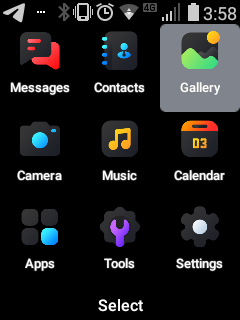
CoolHome - A cool launcher built for the LG Classic Flip

This is a project I've been working on for a while. It's the launcher from the Kazuna Etalk, and I modified it to be compatible with my LG Classic. I decided to show off and post a screenshot on another thread here, and people asked me to release it (of course, I wanted that to happen 🙂). So here it is.

This is a pre-release of the project. Not yet stable. Still has bugs.

Version 1.10:

  • Changed app name to CoolHome
  • Changed launcher intents from the HomeActivity to the intents for LG Classic Flip
  • Changed KeyEvents of the top two softkeys and the 'send' (recent calls) button to the keycodes of the LG Classic Flip
  • Ported the Keyevent Listener to the homeactivity so users can select apps using number keys
  • Removed the use of GlobalSettings that were causing the app to crash (because third party apps may not store their settings there)
  • Removed the voicemail notifications which could not be accessed by a third party app (and therefore the app wouldn't launch
  • Changed App Icons

There are still a few missing parts which I hope to update in the future

Source Code:

As mentioned, this app is a modified version of the Kazuna Etalk Launcher, so I don't have access to the source code. However, I will upload the decompiled Smali [here](https://) in the future as a way for users to track changes as they come through. I am unsure whether or not I will upload the Java used to add features in this app (I probably will if someone requests it).

Contributions:

Contributions are welcomed!

Installation and Usage:

You must install this app with ADB using the -g flag (I also added -r which will be useful for future updates):

adb install -g -r CoolHome-v1.10.apk

To set it as the default Home App, run:

adb shell cmd package set-home-activity com.android.cts.wy.f1home/com.wy.f1home.activity.KeyguardActivity

This app relies on Apps4Flip Launcher for the Apps button. If you don't have Apps4Flip launcher the apps button wont work.

Screenshots:
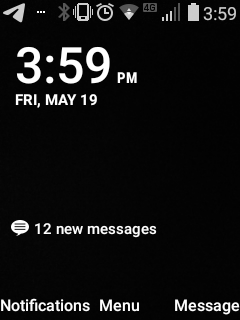
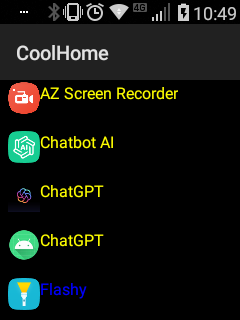
screenshot1 - - - - - - - - - - - - - screenshot


- - - - - - - - - - - -

Credits:

  • Kazuna and Wy for the home app
  • @yeti for some original launcher modifications. I believe he removed a simlock notification and did some things to make the UI nicer.
  • LionScribe for helping me out with some smali questions I had

If your name belongs in this section please remind me!

Download:

(Version 1.10) https://github.com/biden2020prez/CoolHome/releases/download/1.10/CoolHome-v1.10.apk


Newest Verstion:

Version 1.20

Biden2020prez

Your Ad Here - Just Kidding!

Biden2020prez

mr-mayor It can be possible with minimal effort. But I am actually planning on adding a built in app launcher in a later update.

I am thinking of adding an extra shortcut button that the user can choose which app it should open.

For the time being, I will keep it integrated with Apps4Flip launcher which is much more commonly used.

any pics?

Biden2020prez

yteps yes they are in first post here. Maybe your filter blocks it?

Biden2020prez

FliphoneBochur They are actually currently there, but let me see if there is another host that will work better

Biden2020prez

Biden2020prez I just made a screenshot in archive.org and it seems to be missing. Not sure what's up with that. one minute.

Biden2020prez

Hi everyone. I am taking a quick survey on people's preferences for this app. This is only a few questions and I may or may not take more surveys in the future. I would appreciate if people can answer it just to give me an idea of what people are looking for. Thanks!

You can answer it on Google Forms here

samtee

does this work on the exalt

samtee

trying to install on classic but i keep getting this message
Performing Push Install
adb: error: failed to get feature set: more than one device/emulator
PS C:\platform-tools>

Techgen

samtee That happens when you have more than one phone connected to the computer, or if you also have an emulator running. If you can't disconnect the other device, Run adb devices to see what's connected, you then can run adb -s and then the serial number that corresponds to your phone before the command, for example adb -s abcdef install yourpackage.apk (or if the other device is an emulator you can do -d)
If it's recognizing more than one device when it shouldn't, you can try adb kill-server, and restarting adb

samtee

Techgen thank worked btw does this work on the exalt

samtee

Biden2020prez works gr8 but it still has some bugs to work out

Biden2020prez

samtee The main bug I am working on is the keys on the home screen (dpad right, left, up, down)

Any other bugs I should focus on?

yeti

Nice work!!

This is based on my modified version right?

Biden2020prez

yeti Oh yeah it is. Let me add you in the credits😁

Thanks so much (good to see you!!!)

FliphoneBochur

yeti Welcome back! @Biden2020prez and I have actually found a way to unbrick some bricked eTalks. I plan on writing a guide on that in the thread later. Thank you for all your work!

yeti

Biden2020prez FliphoneBochur

Hi y'all it's good to be back :')

I got some quite polished stuff targeting Kyocera and Schok devices i'm almost ready to drop on you lot.
(Also something secret for the TCL Flip as well 🤫)

Also really excited to hear about that eTalk unbrick! Great work guys!!

Biden2020prez

yeti Okay, good to see you! You are making me really excited!

samtee

does this work on the exalt

Biden2020prez

samtee I thought you tried it already...

I made it for LG Classic and that's basically the only device I'm doing this for (at least for now), but it may work on other phones.

samtee

Biden2020prez so i got a fix for one of the bugs basically you disable FP Home
pm disable-user --user 0 com.lge.fphome
then cool home becomes the default home you wont have the problem that when you press end both home launchers come up
to put it back to normal you just run pm enable com.lge.fphome and you have back the original
FP home

note: if someone wants to switch back to the default FP home you should prob re-enable the first one before uninstalling cool home.
ENJOY!!!

samtee

Then all we have to do is set something for all D-PAD keys and we should be good to go
2 more ideas I had is first we should hide the app from the launcher and also you should make another version for people that have the rebel settings on the classic that the settings on the main menu should open to that app
Thanks for all your hard work after I disabled my FP Home it works great

Why not make a version for the tcl

Biden2020prez

samtee Does the method in the top post not work on exalt?

samtee Then all we have to do is set something for all D-PAD keys and we should be good to go

I am working on D-Pad shortcuts.

samtee 2 more ideas I had is first we should hide the app from the launcher

smart, I'll do it in the next update

samtee you should make another version for people that have the rebel settings on the classic that the settings on the main menu should open to that app

It would be hard to update and maintain so many versions. The best is if someone very technical wants to do it and post it for everyone. Anyone who thinks he is capable but needs a bit of help can email me (biden2020prez@gmail.com).

FliphoneBochur

Biden2020prez Anyway, the Exalt screen is too tall for the app and has 12 spots while this launcher has 9.

Biden2020prez

FliphoneBochur I know, but he was using Exalt and posted a different method of setting the default launcher so I think maybe the way I posted doesn't work on that android version.

samtee

Biden2020prez no that was on a classic I was just asking about an Exalt

Biden2020prez

samtee So why did you not just use the command in the original post to make the launcher default?

samtee

Biden2020prez Well because it doesn't actually disable FP Home so whenever I clicked the end button it always popped up an option to either use FP Home or coolhome which was very annoying till I disabled FP Home

Biden2020prez

samtee The whole point is it's not supposed to disable FPHome (which is more dangerous in case someone decides to to uninstall coolhome). but when I ran adb shell cmd package set-home-activity com.android.cts.wy.f1home/com.wy.f1home.activity.KeyguardActivity then it didn't ask me to choose a home app each time. Are you sure you tried it?

Biden2020prez

Version 1.20:

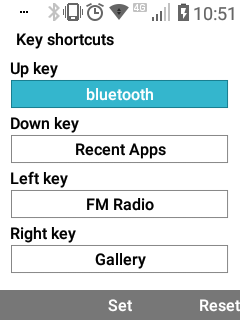
  • Added Dpad Shortcuts
  • Removed CoolHome from showing in App Launchers
  • Added a (very basic) Built-In app launcher
  • Changed Dpad Shortcuts to LG Pakcage and class names

Contributions:

Contributions are welcomed!

Installation and Usage:

(Re)install this app using -g -r in ADB (I also added -r which will be useful for future updates):

adb install -g -r CoolHome-v1.20.apk

To set it as the default Home App (you will need to do after each update), run:

adb shell cmd package set-home-activity com.android.cts.wy.f1home/com.wy.f1home.activity.KeyguardActivity

Notes:

  • Now, the apps section was replaced with the new built in launcher.
  • Access Dpad Hotkey Settings from the home screen by pressing clr button (this will likely change in the future)
  • 'Source' code updated
  • More screenshots added to original post showcasing new features

Download:

https://github.com/biden2020prez/CoolHome/releases/download/1.20/CoolHome-v1.20.apk

samtee

Biden2020prez Yup that's what I tried at first but every time I pushed the END button it always came up the option to switch between the two home apps

samtee

Biden2020prez ok i just tried it again and your right at least on the pervious version that it sets it to default home but only until i tried pressing one of the d-pad buttons and then it crashed and i had that problem so hopefully your new on works better

Biden2020prez

samtee Oh Okay I understand. In the future I plan to explore the possibility of an option in the app to choose default home. But I need to first check if there is a way to do that progrommatically that's supported on the LG Classic Flip.

samtee

Biden2020prez gr8 the new version works great BTW thanks for all your hard work

samtee

Biden2020prez still a couple bugs to work out
1: I'm not sure if its a hiccup but the voicemail and email notification don't show up on the main screen
2: the # key that you usually hold down to put your phone on vibrate doesn't work
but other then that it works great (not so important) it would be nice if the apps could show up nicer on the phone like the TAG app launcher


Biden2020prez

samtee

  1. Not sure if I will ever figure out how to do the email and voicemail Notifications
  2. Let me see if I can get the # button working (i dont even think I knew about it)
  3. Maybe. It's very hard to get a good design when reverse engineering someone else's app, because it's super hard to fix stuff like content views in Layout XML. So currently the App Launcher is written only in JAVA and all the layouts are dynamically created, making it hard to put complex logic. But I am still trying to get a good gridview, or maybe I'll try porting LionScribes launcher to this app (but it would be hard).
Flippy

Biden2020prez adb install -g -r CoolHome-v1.10.apk

You have to change it to 1.20.apk.
Thanks cool home is cool.. Just having an issue like mentioned that the end button keeps bringing up the app switcher. Is there a fix for that coming?

Biden2020prez

Flippy A fix already came! Run:

adb shell cmd package set-home-activity com.android.cts.wy.f1home/com.wy.f1home.activity.KeyguardActivity

You are on LG and it's not working?

(thanks, I edited my post)

Flippy

Biden2020prez Still happening for me. Going to try a full uninstall and reinstall.