All Discussions
  • Tech Help
  • Guide to using adb on windows

Started by whynot · May 16, 2023

1) Download and extract platform-tools for windows

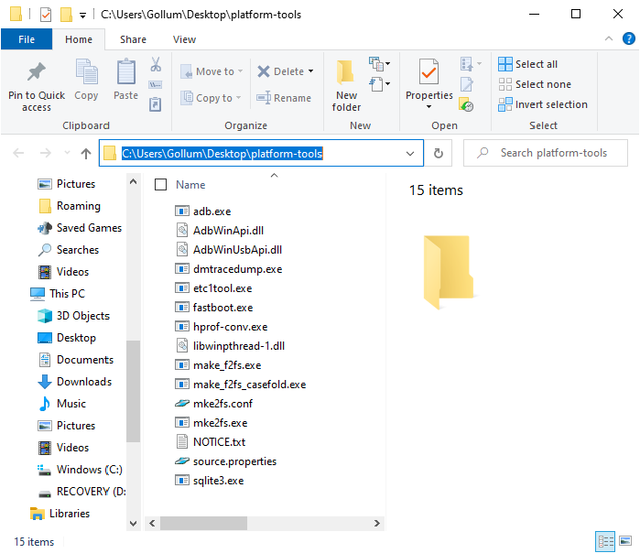
2) Open the platform-tools folder and click on the address bar
1
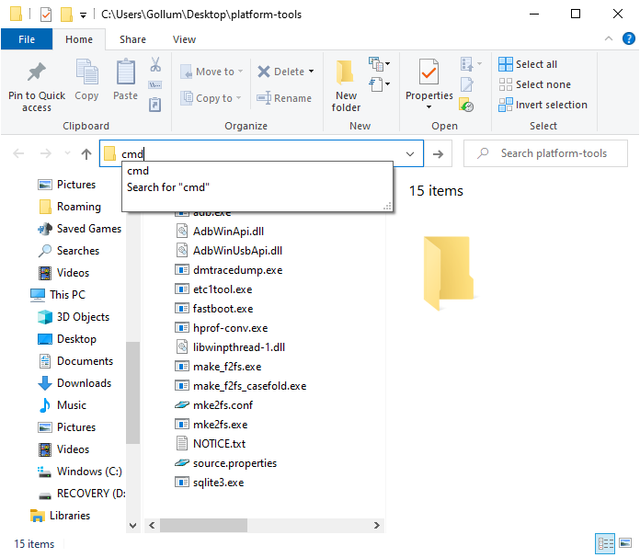
3) Type cmd in the address bar and hit enter
2
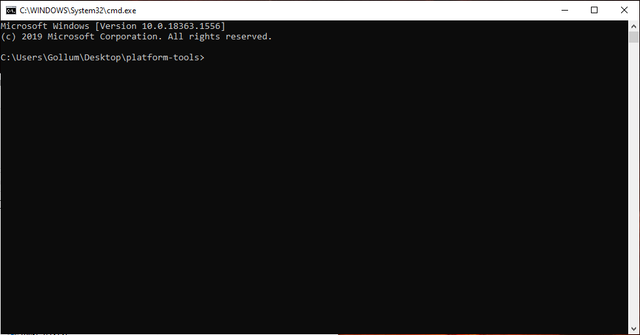
4) You should now have a command window open
3
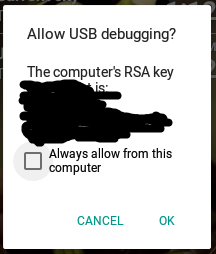
5) Turn on usb debugging on your phone and plug it in to your computer (on LG exalt and classic, make sure the phone is in MIDI or charging mode) [Note: a box will appear on your phone asking to allow from the computer if it isn’t recognized]

LG Exalt: dial ##7764726330 enter code 000000 and go to developer options > usb debugging
LG Classic: dial ##228378 and go to Developer Options > USB debugging
TCL flip 2 and Alcatel Go flip V: dial *#*#33284#*#*
Kyocera, Sonim, Schock and many other phones: go to Settings > About phone > Software info. Press Build number 7 times then go back to Settings > Developer options > USB debugging
Some Sonims: dial *#*#2387#*#* and go to USB debugging
5

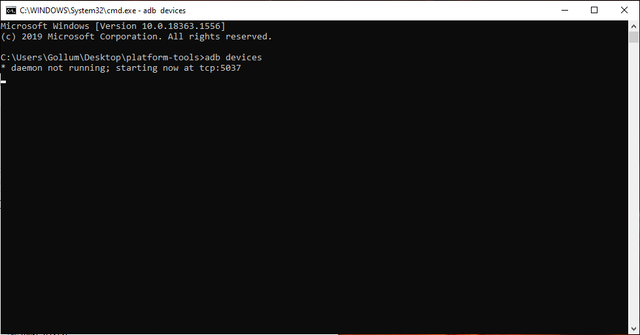
6) In the command prompt window type adb devices and hit enter
4
7) If you did everything correctly, the name of your phone will show up in list of devices

ADB Commands

Uninstalling apps

The code to uninstall apps is adb shell pm uninstall —user 0 package.name, and replace package.name with the package name of the app you wish to uninstall
Here are some examples
Browser: adb shell pm uninstall —user 0 com.android.browser
Email on LG phones adb shell pm uninstall —user 0 com.lge.email
Here are some other package names
Message+: com.verizon.messaging.vzmsgs
Messaging: com.android.mms
For more package names see this Google spreadsheet made by @FliphoneBochur

Installing apps

Note: most apps do not need adb install, you can click on the apk file on your phone (in file manager or, on some phones, have it sent to your phone via Bluetooth and click on it in notifications)
Put the apk file in the platform-tools folder and run adb install -g appname.apk, replacing appname.apk with the file name of the apk; for example the smartlist app from the apps4flip website is smartlist.apk.
Note: If there is a space in the file name (for example smart list.apk) you need to put quotation marks on either side (adb install -g “smart list.apk”)

Troubleshooting

Device not showing up: Make sure the wire you are using allows data transfer (some wires are damaged and my may work for charging but won't be recognized by the computer)
Commands won't work: Spelling is important! Check that everything is spelled right. Some commands are case sensitive (make sure the correct letters are uppercase and lowercase).

FliphoneBochur

whynot This is great!
Just a comment on your phone adb setup instructions:
KaiOS is of no interest here, as its adb is locked down, so if you're going by Android phones, the only 2 with that code are the TCL Flip 2 and the Alcatel Go Flip V
What you wrote for Kyocera applies to Schok, Sonim, and many other phones, so that one could say all other phones.

Techgen

whynot The sonim xp3 is *#*#2387#*#* pressing the build number doesn't work for that phone

Techgen thanks. I think that’s also true for the xp5

Techgen

FliphoneBochur I have 2 AT&T ones, and one sprint, and build number didn't work on any. It could be it works on some, maybe it depends on the software version, but it for sure makes sense to put in the other version also

Techgen

whynot Np. Otherwise very nice clear guide

What is the package name for the email app on non LG phones? (Or any other app I should add to whynot)

FliphoneBochur

whynot com.android.email I have them all in a spreadsheet.
Here's the link. This is part of a big project I'm working on that's coming out very soon!
EDIT: I just made a thread about this: FliphoneBochur

FliphoneBochur

whynot I'm just reading this now. You did a great job! Thank you!

Biden2020prez

FliphoneBochur I don't understand why people use spreadsheets unless you are doing an equation. It makes life so cunfusing... 🙂 👍️ 🎓️

FliphoneBochur thanks. I noticed the other threads getting clogged with basic questions about using adb (which was getting annoying for everyone)

